Barber Power Point Template: Design & Features
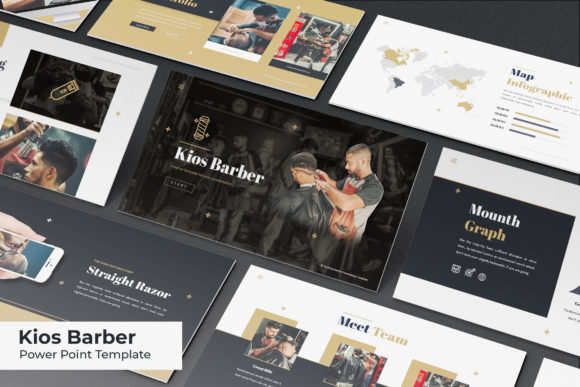
Elevating a presentation from a simple slideshow to a compelling visual narrative requires more than just good content; it demands a cohesive design language that speaks directly to your audience. The Barber Power Point Template serves as a comprehensive design system tailored specifically for the grooming, styling, and personal care industries. Rather than offering a single static look, this resource provides a versatile framework built on 150 total slides distributed across five distinct premade color themes. With 30 slides dedicated to each color variation, users can select a palette that aligns with their specific brand identity or switch between themes to test different visual approaches without rebuilding their deck from scratch.
Why Visual Consistency Matters Across Audiences
Different stakeholders interact with presentation templates through unique lenses. For a freelance barber building a personal brand, the priority is often speed and aesthetic appeal. They need to showcase portfolio work quickly without spending hours adjusting alignment or font sizes. Conversely, a marketing director for a multi-location salon chain prioritizes brand consistency and data visualization. They require a template that can handle complex service menus, pricing tiers, and quarterly growth metrics while maintaining a polished, professional appearance. Educators in cosmetology schools face yet another set of needs, focusing on clarity, instructional flow, and the ability to break down technical concepts into digestible visual segments.
The Barber Power Point Template addresses these varied priorities through its structural flexibility. Beginners appreciate the drag-and-drop functionality that removes the technical barrier to entry, allowing them to focus on storytelling rather than software mechanics. Experienced designers and agency professionals value the master slide architecture, which ensures that global changes propagate instantly across the entire deck. This balance makes the template useful whether you are presenting a business plan to investors, teaching a masterclass on fading techniques, or launching a new line of grooming products to consumers.
Handcrafted Infographics and Data Visualization
One of the most significant advantages of this template is the inclusion of handcrafted infographics within the Keynote section. In an industry driven by trends, statistics, and service comparisons, generic charts often feel out of place. These custom-designed graphics allow presenters to visualize data in a way that feels organic to the barbering and beauty sector. Whether illustrating the breakdown of service revenue, comparing product ingredients, or mapping out client retention rates, these elements transform abstract numbers into engaging visual stories.
For business owners and marketers, this feature reduces the reliance on external graphic designers. Instead of outsourcing every chart or diagram, you can utilize pre-built assets that maintain pixel-perfect quality at any scale. Because these graphics are fully editable, they adapt to your specific data points while retaining their professional craftsmanship. This capability is particularly valuable for entrepreneurs who need to pitch to investors but lack the budget for bespoke illustration work.
Navigating Layout Variety and Master Slides
A common frustration with niche templates is a lack of layout diversity. You might find excellent title slides but struggle to create a functional pricing table or a team introduction page. This collection mitigates that risk by providing 30 unique slides per color theme. This volume ensures coverage for virtually every stage of a presentation lifecycle. Section break slides help organize long-form content into logical chapters, preventing audience fatigue during detailed workshops or annual reviews. Gallery and portfolio slides are optimized for high-resolution imagery, allowing barbers and stylists to let their work speak for itself without cluttered borders or distracting backgrounds.
The underlying master slide system is what truly empowers efficient workflow. When you adjust a logo, update a contact footer, or change a primary accent color on the master slide, those updates apply globally. For small business owners managing multiple presentations—such as staff training decks, client proposals, and vendor pitches—this time-saving feature is invaluable. It ensures reliability and prevents the embarrassing inconsistencies that can occur when manually editing individual slides. Professionals evaluating this template should view the master slide structure as a long-term asset that streamlines future content creation beyond the initial project.
Technical Specifications and File Management
Understanding what is included helps set realistic expectations and ensures a smooth setup process. The package contains five KEY files, corresponding to the five widescreen color variations. This organization allows you to keep your workspace uncluttered by only opening the specific color theme you intend to use. The widescreen format is now the industry standard for digital displays, projectors, and video conferencing platforms, ensuring your presentation looks crisp and proportional in modern viewing environments.
Typography plays a crucial role in the overall aesthetic, and this template simplifies font management. A readme file is included with direct download links for the free fonts used in the design. This eliminates the guesswork and prevents the "missing font" errors that can ruin formatting. By providing these resources upfront, the template supports users who may not have extensive font libraries, ensuring the final output matches the preview exactly. However, it is important to note that all photographs and pictures seen in the preview are for illustration purposes only and are not included in the download. Users must supply their own high-quality imagery, which encourages authenticity and prevents the generic stock-photo look that can undermine credibility.
Evaluating Fit for Your Specific Goals
Determining whether the Barber Power Point Template is the right tool depends on your current objectives and skill level. If you are a hobbyist or student looking to learn presentation design, the structured layouts serve as an educational guide. By deconstructing how the slides are built, you gain insight into hierarchy, whitespace, and color theory within a relevant context. The learning value here extends beyond the immediate project, building transferable skills for future creative endeavors.
For commercial users, the evaluation criteria shift toward ROI and versatility. Ask yourself if the five color options provide enough variety for your brand guidelines or if you will need to customize further. Consider whether the existing infographic styles match the type of data you typically present. If your business relies heavily on video content, verify that the gallery slides can accommodate multimedia embeds effectively. The template’s strength lies in its specificity; it is designed for grooming and styling contexts. If your presentation falls outside this vertical, the thematic elements may require significant modification to feel appropriate.
Balancing Creativity with Practical Constraints
Creativity thrives within constraints, and this template provides a supportive boundary that accelerates production. Picture placeholders are resizable and editable, accommodating various aspect ratios without distortion. This flexibility is essential for barbers and stylists whose portfolio images may range from vertical portraits to horizontal landscape shots. The drag-and-drop interface respects the user's time, acknowledging that in a fast-paced service industry, hours spent fiddling with alignment are hours lost to revenue-generating activities.
Ultimately, the decision to use this resource should be based on how well it bridges the gap between your vision and your technical capacity. Beginners gain confidence through guided design, while professionals gain efficiency through robust architecture. Whether you are educating the next generation of stylists, securing funding for a new shop, or simply organizing your service offerings for clients, the template offers a foundation that is both aesthetically pleasing and functionally sound. By leveraging these 150 slides and five color systems, you can produce presentations that look custom-designed while retaining the agility to update and iterate as your business evolves.