Fortify Presentation Template: Design with Purpose
Great design is rarely about adding more; it is usually about clarifying what matters. The Presentation Template - Fortify embodies this philosophy by stripping away visual noise to focus on structure, hierarchy, and message clarity. For professionals ranging from startup founders to creative directors, this template serves as a foundational system rather than a rigid set of slides. It bridges the gap between corporate professionalism and modern wellness aesthetics, offering a versatile canvas that adapts to high-stakes pitch decks, internal team updates, or personal portfolio showcases without losing its distinct character.
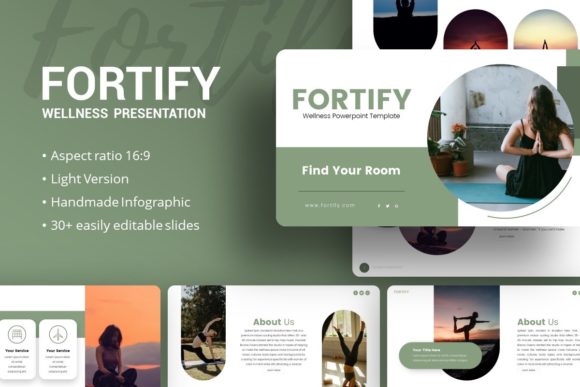
The name "Fortify" suggests strength and resilience, qualities that translate directly into the slide architecture. Unlike generic templates that rely heavily on trendy effects, this collection prioritizes readability and information retention. With 35 unique slides per template, it provides enough variety to handle complex narratives while maintaining a cohesive visual thread. Whether you are presenting quarterly financials or launching a new mindfulness app, the underlying grid system ensures your content remains organized and accessible to your audience.
Adapting the Aesthetic for Diverse Industries
One of the most practical strengths of the Presentation Template - Fortify is its chameleon-like ability to serve different sectors without requiring a complete redesign. The balance between clean lines and organic warmth makes it particularly effective for industries that need to convey trust alongside innovation.
For Creative Agencies and Portfolios, the template acts as a neutral frame that lets client work take center stage. The picture placeholders are designed with drag-and-drop functionality, allowing designers to swap in high-resolution photography or case study mockups instantly. Because the illustrations are pixel-perfect and resizable, you can scale visual elements up for full-bleed impact or down for subtle accents without worrying about distortion. This flexibility is crucial for agencies that need to present diverse projects within a single, branded deck.
In the Corporate and Business sector, clarity is currency. Executives often struggle with data-heavy presentations that overwhelm stakeholders. Fortify addresses this through handcrafted infographics built directly in PowerPoint. These are not static images but editable vector shapes that allow you to update charts, graphs, and process flows natively within the software. This means your Q3 report can look polished and bespoke without requiring a round-trip to Adobe Illustrator. The master slide foundation ensures that headers, footers, and branding elements remain consistent across all 35 slides, reducing formatting errors during last-minute edits.
Wellness and Health Startups will find the template’s inherent style aligns naturally with their brand values. The spacing and typography choices evoke a sense of calm and order, which is essential when communicating topics related to mental health, fitness, or holistic care. However, it avoids the cliché "spa" aesthetic often found in niche wellness templates. Instead, it offers a grounded, professional look that appeals to investors and partners who expect rigorous business planning alongside empathetic messaging.
Maximizing the Master Slide System
To truly leverage the Presentation Template - Fortify, users must understand the power of the Master Slide system. Many presenters treat templates as a collection of individual pages, manually adjusting fonts and colors on every slide. This approach is inefficient and prone to inconsistency. Fortify is engineered so that global changes propagate instantly.
- Global Branding Updates: Change your primary color or logo placement on the master slide, and it updates across the entire deck. This is invaluable for freelancers managing multiple clients or educators updating course materials semester to semester.
- Typography Hierarchy: The template establishes clear distinctions between headlines, subheads, and body text. Respecting this hierarchy improves cognitive load for your audience. If you need to adjust sizing for accessibility or projection distance, do it at the master level to maintain proportional relationships.
- Placeholder Management: The drag-and-drop picture placeholders are anchored to specific aspect ratios. This prevents the common issue of stretched or cropped images that plague amateur presentations. Always use the designated insertion points rather than pasting images freely onto the canvas.
By treating the template as a design system rather than a coloring book, you save hours of production time. This efficiency allows you to focus on refining your narrative and rehearsing your delivery, which ultimately matters more than pixel-pushing.
Strategic Applications for Pitch Decks and Proposals
When using Fortify for fundraising or sales proposals, the structure of your content should dictate your slide selection. The 35-slide library includes specific layouts optimized for persuasion. Rather than starting from scratch, identify the slides that map to standard pitch deck components: problem statement, solution, market size, business model, and team.
The handcrafted infographics are particularly useful for the "traction" and "financials" sections. Investors scan these slides quickly, looking for upward trends and clear metrics. The vector-based nature of these graphics allows you to highlight specific data points using color contrast effectively. For example, you might use your primary brand color for growth metrics and a neutral gray for context, guiding the viewer’s eye exactly where you want it.
For service providers and consultants, the template supports proposal narratives that blend educational content with sales messaging. Use the text-heavy layouts to explain your methodology, then transition to visual case studies to prove efficacy. The consistency of the Presentation Template - Fortify helps build subconscious trust; when your proposal looks organized and intentional, clients assume your service delivery will be too.
Technical Considerations and Best Practices
While the template is robust, achieving professional results requires adherence to a few technical best practices. First, always utilize the included documentation file. It contains specific guidance on font installation, icon usage, and troubleshooting common PowerPoint quirks. Skipping this step often leads to missing glyphs or layout shifts that frustrate users unfamiliar with advanced template features.
Second, remember that the demo images are for preview purposes only. This is actually an advantage, as it forces you to source authentic imagery that reflects your actual brand rather than relying on stock photography that thousands of others have used. When selecting replacement images, prioritize authenticity over perfection. Candid shots of your real team or genuine product photos often perform better in presentations than polished, generic stock assets.
Third, respect the whitespace. The Presentation Template - Fortify uses negative space as an active design element to create breathing room and focus. Resist the urge to fill every corner with text or graphics. If a slide feels empty, it is likely functioning correctly as a pause point in your narrative. Overcrowding destroys the template’s core value proposition of clarity.
Extending Value Beyond the Screen
A well-structured presentation template should offer utility beyond the live talk. Because Fortify is based on scalable vectors and master slides, it can easily be repurposed for other formats. Export individual slides as high-resolution PDFs for leave-behind documents or email attachments. The infographic slides can be extracted and resized for social media carousels or LinkedIn posts, extending the lifespan of your content creation efforts.
Educators and trainers can adapt the template into interactive workshop materials. The clean layouts provide ample space for discussion prompts, exercise instructions, or reflection questions. By maintaining a consistent visual environment throughout a multi-hour session, you reduce cognitive fatigue for participants, allowing them to stay engaged with the material longer.
Ultimately, the Presentation Template - Fortify is a tool for thinking. It imposes just enough constraint to spark creativity without stifling expression. Whether you are building a company profile, showcasing a photography portfolio, or pitching a wellness initiative, the template provides the structural integrity needed to communicate with confidence. By focusing on the fundamentals of good design—hierarchy, consistency, and clarity—you ensure that your message resonates long after the projector is turned off.