Alula Brush Power Point Template: Design Efficiency
Creating a visually cohesive presentation often requires more time than developing the actual content. For professionals, educators, and entrepreneurs, the gap between having strong data and presenting it effectively can be significant. The Alula Brush Power Point Template addresses this specific friction point by providing a structured yet flexible design system. Rather than starting from a blank slide or relying on generic corporate themes, this template offers a curated aesthetic that balances artistic expression with professional clarity. It is designed for users who need to communicate complex ideas through visuals without spending hours adjusting alignment, color palettes, or typography.
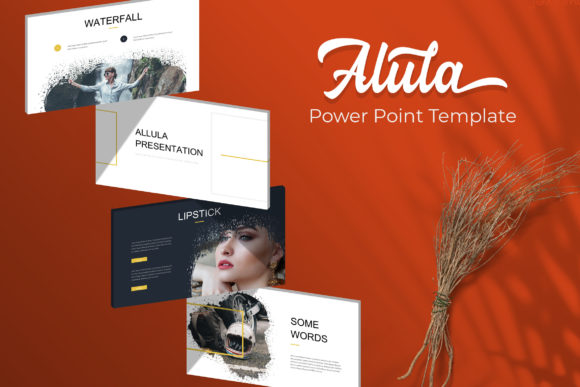
The core value of the Alula Brush Power Point Template lies in its volume and variety. With 150 total slides distributed across five distinct premade color schemes, it functions less like a single template and more like a comprehensive design library. Each color variation includes 30 unique slides, ensuring that you have adequate layout options regardless of your chosen branding. This structure allows for rapid iteration. If a client prefers a warmer tone or a stakeholder requests a darker theme, you can switch between the five PPTX files instantly without rebuilding your deck from scratch. This capability is particularly useful for agencies or freelancers who manage multiple brands simultaneously.
Streamlining Visual Data Communication
Data visualization is often where presentations fail. Standard charts can appear sterile, while overly decorative graphics may obscure the message. The handcrafted infographics included in this template bridge that gap. Unlike auto-generated smart art, these illustrations are pixel-perfect and designed specifically within PowerPoint. This distinction matters because it ensures that every element remains fully editable. You can resize, recolor, and adjust infographic components using native PowerPoint tools without needing external vector software like Adobe Illustrator.
For marketers and business analysts, this means you can update quarterly figures or project timelines directly in the slide master. The drag-and-drop functionality simplifies the process of swapping out placeholder graphics for your own assets. Because the infographics are built on master slides, global changes propagate throughout the deck, maintaining consistency even when individual data points change. This feature supports accurate storytelling, allowing you to focus on interpreting the data rather than formatting the bars and circles that represent it.
Enhancing Narrative Flow with Section Breaks
A common issue in lengthy presentations is audience fatigue. When information density is high, viewers struggle to retain key takeaways. The Alula Brush template mitigates this through dedicated section break slides. These are not merely dividers; they serve as visual anchors that reset attention and signal transitions between topics. In educational settings or training workshops, these breaks provide natural pauses for Q&A or reflection. For pitch decks, they help delineate different aspects of a business proposal, such as moving from market analysis to financial projections.
The inclusion of gallery and portfolio slides further supports narrative structure. These layouts are optimized for showcasing visual work, case studies, or product lines. The picture placeholders are resizable and editable, accommodating various aspect ratios without distortion. This flexibility is essential for photographers, designers, and creative directors who need their work to look polished within a standardized frame. By using pre-formatted gallery grids, you avoid the tedious manual alignment that often consumes the final hours before a deadline.
Technical Flexibility and Workflow Integration
Ease of use is determined by how well a template integrates into existing workflows. The Alula Brush Power Point Template provides five widescreen PPTX files, adhering to modern display standards. Widescreen formatting is now the default for most conference rooms, webinars, and digital displays. Providing separate files for each color variation reduces file bloat and load times compared to a single massive file containing all variations. This organizational choice reflects an understanding of practical file management.
Typography often presents licensing hurdles for presenters. This template resolves that uncertainty by including a Readme First file with direct download links for the free fonts used. This transparency prevents the dreaded "missing font" error when opening the file on a different computer. It also ensures legal compliance for commercial use, which is a critical consideration for businesses and publishers. Knowing exactly which typefaces are required and where to obtain them legally saves administrative time and protects your organization from potential licensing issues.
Practical Considerations and Limitations
While the Alula Brush Power Point Template offers extensive resources, it is important to understand its scope to maximize its utility. A notable limitation is that the photographs and pictures seen in preview images are not included. They are intended solely for illustration purposes. Users must source their own imagery to complete the look. This is standard practice for premium templates, but it requires planning. You should have access to stock photography or original assets before beginning your design work to maintain momentum.
Additionally, while the pixel-perfect illustrations are editable, they do require a basic familiarity with PowerPoint’s shape and grouping tools. Users accustomed only to typing text into boxes may need a brief learning curve to manipulate complex infographic elements effectively. However, because everything is native to PowerPoint, the skills learned here transfer to other projects. This template is best suited for users who want to elevate their design quality but still wish to remain within the Microsoft ecosystem. Those requiring advanced animation or 3D rendering might need to supplement this template with specialized software, but for static and semi-dynamic presentations, it provides a robust foundation.
Who Benefits Most from This Design System
The breadth of the Alula Brush Power Point Template makes it applicable to a wide demographic, but certain groups will derive specific advantages. Educators and trainers benefit from the sheer volume of slides, which allows for the creation of course materials that remain visually engaging over long semesters. The ability to color-code different modules using the five premade palettes helps students mentally organize information.
Entrepreneurs and small business owners appreciate the cost-efficiency. Hiring a graphic designer for a custom pitch deck can be prohibitively expensive. This template offers a middle ground between DIY amateurism and agency pricing. It provides professional-grade aesthetics that build credibility with investors and clients without the custom design fee. Freelancers and consultants also find value in the reusability. Once familiar with the master slide structure, creating new proposals becomes a matter of content insertion rather than design invention, significantly reducing billable hours spent on formatting.
Ultimately, the Alula Brush Power Point Template serves as a productivity tool disguised as a design asset. Its 150 slides and five color variations are not just about having options; they are about reducing decision fatigue. When the structural and aesthetic decisions are already made, your cognitive resources are freed for what truly matters: crafting a compelling message and connecting with your audience. Whether you are presenting quarterly earnings, teaching a workshop, or pitching a creative concept, this template provides the reliable scaffolding needed to deliver your ideas with confidence and clarity.