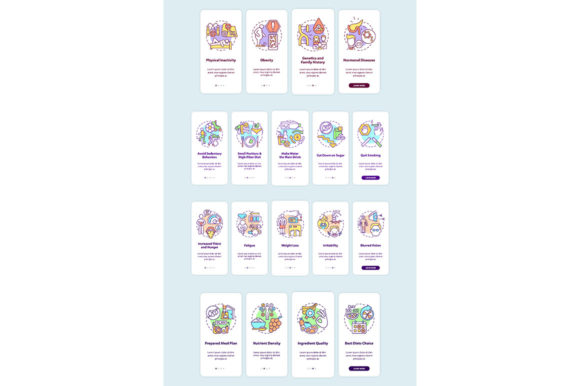
Evaluating the Property Security App Page Screen Bundle for Modern Onboarding Design
Designing a user interface for property security applications requires a delicate balance between technical authority and user accessibility. Security systems are inherently complex, involving hardware integration, zoning, sensor calibration, and emergency protocols. When users first interact with these systems via mobile, the onboarding experience determines whether they feel empowered or overwhelmed. The Property Security App Page Screen Bundle addresses this specific friction point by providing pre-designed, vector-based templates focused on protection system walkthroughs and initial setup flows.
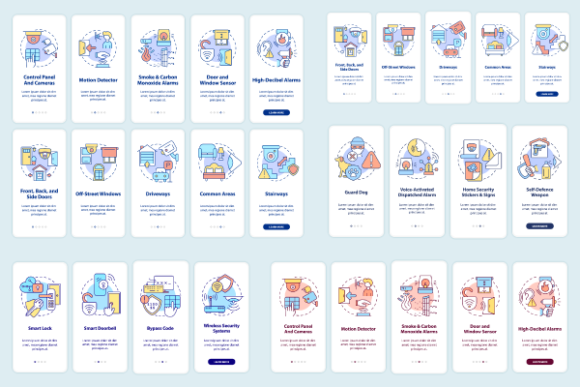
Unlike generic UI kits that offer broad app structures, this collection targets the niche requirements of safety and surveillance technology. It includes linear color illustrations and five-step graphic instructions specifically conceptualized for security contexts. For product designers, UX researchers, and agency teams evaluating resources, understanding the distinct utility of this bundle compared to generalist alternatives is essential for making an informed procurement decision. The choice often comes down to the tradeoff between immediate thematic relevance and long-term structural flexibility.
Distinguishing Features of Specialized Security UI Kits
The primary differentiator of the Property Security App Page Screen Bundle is its domain-specific content strategy. General mobile UI kits typically provide standard e-commerce, social media, or profile screens. While adaptable, they lack the semantic visual language required for security. This bundle, conversely, is built around the concept of a "protection system walkthrough." This includes five distinct steps of graphic instructions designed to guide users through arming procedures, sensor testing, or zone configuration.
This specialization extends to the visual style. The use of linear color illustrations serves a functional purpose beyond aesthetics. In security interfaces, clarity is paramount. Heavy gradients or overly playful 3D renders can distract from critical status indicators. Linear vectors with controlled color accents allow designers to maintain high contrast and readability, which is vital when users are configuring alarms or reviewing safety protocols in low-light conditions. The inclusion of editable source files in AI, EPS, and SVG formats ensures that these illustrations can be recolored to match strict brand guidelines without losing their instructional integrity.
Comparing Thematic Bundles vs. Comprehensive Design Systems
When researching design assets, professionals often weigh thematic bundles against comprehensive design systems. A comprehensive system offers hundreds of components but may require significant modification to fit a security context. You might spend days redesigning generic icons to look like door sensors or rewriting copy placeholders to reflect alarm states. The Property Security App Page Screen Bundle reduces this adaptation time by arriving with contextually accurate assets.
However, this focus introduces limitations. If your application requires extensive features outside the security scope—such as community forums, payment processing for subscription services, or smart home energy management—you may find gaps in this bundle. In such cases, a hybrid approach is often most effective: using this specialized bundle for the core onboarding and security management flows while supplementing it with a broader library for secondary features. Evaluators should audit their feature roadmap against the bundle’s contents to determine if it covers the critical path or merely the periphery.
Analyzing Format Versatility and Workflow Integration
The technical delivery of design assets significantly impacts team velocity. This bundle supports a wide spectrum of file formats, including JPEG, PNG, AI, EPS, and SVG. Understanding when to leverage each format is key to maximizing value across different stages of product development.
- SVG and AI/EPS: These vector formats are essential for the actual interface design. They allow for infinite scaling and direct editing within tools like Figma, Sketch, or Adobe Illustrator. For the five-step walkthrough graphics, vector formats ensure that instructional diagrams remain crisp on any device resolution.
- PNG: High-resolution raster exports are valuable for stakeholder presentations, marketing brochures, or app store screenshots where the design needs to be displayed statically without requiring vector rendering software.
- JPEG: Compressed formats serve best for quick internal sharing, mood boarding, or client approvals where file size matters more than editability.
Teams working strictly in web-based prototyping tools may prioritize SVG compatibility above all else. Conversely, agencies producing print collateral alongside digital products will value the EPS and AI inclusions for brochure templates and infographic elements. The versatility here suggests the bundle is positioned not just for UI designers, but for cross-functional teams handling both product and marketing deliverables.
Assessing Visual Style: Linear Illustrations in Safety Tech
Visual trends in mobile apps cycle frequently, but security interfaces tend to favor stability over novelty. The linear illustration style included in this bundle aligns with current enterprise and utility design standards. Compared to flat design or skeuomorphism, linear art provides clear boundaries and hierarchy without visual noise. This is particularly relevant for onboarding, where cognitive load must be minimized.
When comparing this style to other available options, consider the emotional tone of your product. Linear illustrations with cool color palettes convey professionalism and calm control. If your security product targets a consumer demographic that prefers warmth or approachability (e.g., baby monitors or pet cams), you may need to adjust the stroke weight or color temperature of these templates. However, for property protection, access control, and commercial security, the provided aesthetic is generally aligned with user expectations of reliability and precision.
Decision Factors: When to Choose This Resource
Selecting the right design resource involves analyzing project constraints, budget, and timeline. The Property Security App Page Screen Bundle is rarely a universal solution, but it excels in specific scenarios.
Ideal Use Cases
This bundle is particularly advantageous for teams facing tight deadlines for MVP launches or investor demos. If you need to demonstrate a sophisticated onboarding flow for a property security app within days rather than weeks, the pre-conceptualized five-step walkthrough provides a massive head start. It is also highly suitable for agencies that specialize in IoT or smart home verticals, as the assets can be repurposed across multiple client projects with similar thematic needs.
Furthermore, non-designers or junior developers building internal tools or prototypes will benefit from the structured nature of the onboarding screens. Rather than struggling to visualize how to explain a complex arming sequence, they can rely on the professional GUI vector templates to communicate the intended user experience effectively.
Situations Requiring Alternatives
If your project demands a fully bespoke design system with unique proprietary iconography, a stock bundle may introduce visual inconsistency. Custom illustration styles are difficult to merge seamlessly with pre-made assets. Additionally, if your security app relies heavily on real-time mapping, video feeds, or augmented reality overlays, static screen bundles may not adequately represent the dynamic nature of the interface. In these instances, investing in custom UI/UX design or specialized AR/VR asset libraries may yield better long-term results.
Budget allocation also plays a role. For large-scale enterprise platforms, the cost of a bundle is negligible compared to engineering hours saved. For hobbyist projects or open-source initiatives, free community resources might suffice, albeit with lower polish and fewer format options. The value proposition here is strongest for professional teams where time-to-market directly correlates with revenue or funding milestones.
Strategic Value Beyond Individual Screens
While the immediate utility lies in the mobile app screens, the broader strategic value emerges from the ecosystem of assets. BSD studio provides a variety of products, topics, and file types, suggesting that this bundle is part of a larger coherent design language. This consistency matters when scaling a product line. If you anticipate expanding from property security to vehicle tracking or personal safety wearables, sourcing assets from a provider with a unified stylistic approach helps maintain brand cohesion across disparate products.
The inclusion of brochure templates and infographic elements further extends the ROI. Product teams often struggle to align marketing materials with the actual app interface. Having matching visual assets for both the GUI and external communications ensures that the promise made in advertising matches the reality of the user experience. This alignment builds trust—a critical currency in the security sector.
Ultimately, the decision to utilize the Property Security App Page Screen Bundle should be based on a pragmatic assessment of your current design debt and future roadmap. It offers a robust foundation for onboarding and instructional design within the property protection niche, saving significant conceptualization time. By weighing its specialized strengths against the potential need for broader customization, teams can integrate this resource effectively to accelerate development while maintaining high standards of user experience and visual quality. Whether used as a complete framework or a supplementary asset library, it represents a practical solution for the specific challenges of designing for safety and security technologies.