Evaluating Presentation Template - Frame for Professional Use
Selecting the right visual framework is a critical step in preparing any professional presentation. The Presentation Template - Frame offers a structured solution designed to address common design challenges faced by creative agencies, corporate teams, startups, and individual professionals. Rather than viewing this asset merely as a collection of slides, it is more accurate to evaluate it as a comprehensive design system built within Microsoft PowerPoint. Understanding its specific architecture, feature set, and intended use cases allows potential users to determine if it aligns with their current project requirements and technical capabilities.
Defining the Scope and Utility of Frame
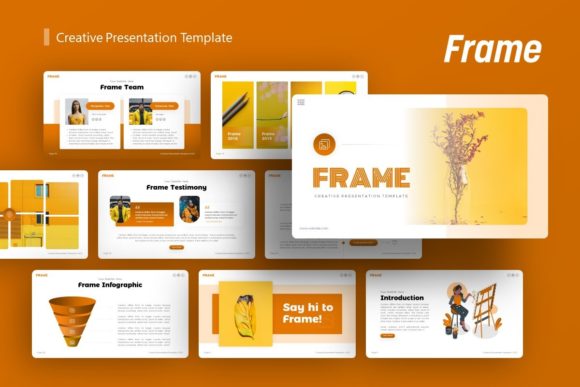
Presentation Template - Frame is a pre-designed slide deck containing 36 unique layouts tailored for diverse communication needs. Its primary function is to reduce the time spent on formatting and visual alignment, allowing presenters to focus on narrative structure and content delivery. The template supports a wide range of applications, including company profiles, pitch decks, photography portfolios, and personal branding materials. This versatility stems from its modular design, which avoids overly niche aesthetics in favor of adaptable structures that can be modified to suit different industries.
The inclusion of handcrafted infographics distinguishes this template from generic options. These are not static images but editable vector elements created directly within PowerPoint. This ensures that data visualization remains consistent with the overall theme while allowing users to update statistics, charts, and diagrams without requiring external graphic design software. For users evaluating this template, the ability to modify these infographics natively is a significant factor in long-term usability and maintenance.
Key Benefits and Operational Advantages
The primary value proposition of Presentation Template - Frame lies in its adherence to Master Slides. This technical foundation ensures global consistency across the deck. When a user modifies a color scheme, font pairing, or logo placement on the master slide, those changes propagate automatically to all associated layouts. This feature is essential for maintaining brand integrity, particularly in collaborative environments where multiple stakeholders may edit the file. It eliminates the common issue of "slide drift," where individual slides deviate from established guidelines due to manual adjustments.
Furthermore, the template utilizes pixel-perfect illustrations and fully resizable graphics. In practical terms, this means that visual assets maintain clarity regardless of how they are scaled or cropped. The drag-and-drop picture placeholders streamline the process of inserting custom imagery, reducing the friction often associated with replacing stock photos. For non-designers, these guardrails prevent common layout errors such as misalignment, inconsistent spacing, or low-resolution visuals, resulting in a polished final product with minimal effort.
Tradeoffs and Technical Considerations
While Presentation Template - Frame offers substantial efficiency gains, prospective users must weigh certain tradeoffs. The reliance on 36 predefined slides provides structure but also imposes boundaries. Users seeking highly unconventional or avant-garde layouts may find the template restrictive. While the contents are easily customizable, the underlying grid system is fixed. Deviating significantly from this grid requires advanced knowledge of PowerPoint’s slide master functionality and may negate the time-saving benefits of using a template.
Additionally, it is crucial to manage expectations regarding media assets. As noted in the product documentation, all images shown in the demo are for preview purposes only and are not included in the downloadable files. Users must have access to their own high-quality photography or licensed stock images to replicate the visual impact of the demonstration. This separation of design structure and content means the final output quality is heavily dependent on the user's existing media library. Organizations without robust image assets should budget time and resources for sourcing appropriate visuals before beginning the customization process.
File compatibility is another consideration. Although the .PPTX format is an industry standard, complex vector infographics and master slide configurations can sometimes behave differently across varying versions of PowerPoint or when opened in alternative software like Keynote or Google Slides. Users operating in mixed-software environments should test the template immediately upon acquisition to verify that all editable elements remain functional.
Ideal Use Cases and Strategic Fit
Presentation Template - Frame is particularly well-suited for scenarios where speed and professionalism are paramount. Startups preparing investor pitch decks benefit from the clean, data-focused layouts that communicate credibility without distracting embellishments. Creative agencies and photographers can leverage the portfolio-specific slides to showcase work in a structured gallery format that emphasizes imagery over text. Corporate teams updating quarterly reports or internal profiles will find the infographic capabilities valuable for transforming dense information into digestible visual summaries.
The template also serves personal portfolios effectively. Freelancers and consultants who need to present case studies or service offerings can utilize the modular layouts to create a cohesive narrative. Because the design is neutral yet sophisticated, it adapts well to personal branding without overpowering the individual’s unique identity. In these contexts, the template acts as a reliable container for content, ensuring that the presentation looks professionally designed even if the creator lacks formal design training.
When to Consider Alternatives
Despite its strengths, Presentation Template - Frame may not be the optimal choice for every situation. If a project requires extensive animation, video integration, or interactive elements beyond basic transitions, users might need a template specifically engineered for multimedia or web-based presentation platforms. Frame focuses on static visual clarity and print-ready fidelity rather than motion graphics.
Similarly, organizations with extremely rigid brand guidelines that conflict with the template’s base geometry may find customization more labor-intensive than starting from scratch. If the required slide dimensions, margin ratios, or typographic hierarchies differ fundamentally from the template’s master slides, the effort to restructure the file could exceed the time saved. In such cases, a bespoke design or a template built specifically for that brand’s guidelines would be more efficient.
Making an Informed Decision
Evaluating Presentation Template - Frame requires balancing immediate convenience against long-term flexibility. The inclusion of documentation and vector icons adds tangible value, reducing the learning curve and providing necessary assets for future iterations. However, the decision should ultimately hinge on whether the 36-slide structure maps logically to your specific content outline. Before purchasing, users should audit their existing material to ensure it fits naturally within the provided frameworks. When the content strategy aligns with the template’s architecture, Frame serves as a powerful accelerator for producing high-quality presentations. When there is a mismatch, the tool risks becoming a constraint rather than an enabler. By assessing these factors objectively, professionals can select a presentation solution that genuinely supports their communication goals.