Google Slides Template Technozi: Modern Tech Decks
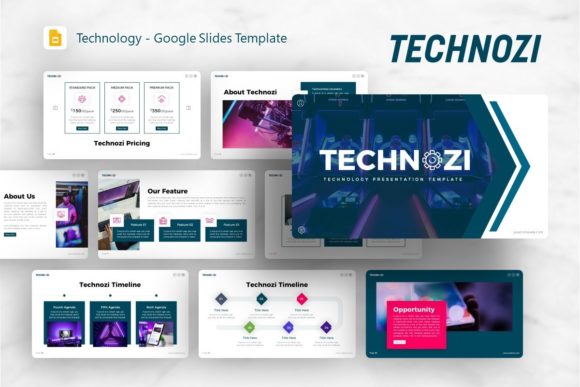
When presenting complex technological concepts or startup visions, the visual container matters as much as the content itself. The Google Slides Template Technozi addresses a specific gap in presentation design: the need for a layout that feels inherently digital and forward-thinking without sacrificing corporate professionalism. Unlike generic business themes that rely on stock photos of handshakes and glass buildings, Technozi utilizes a distinct visual language rooted in modern typography, clean geometry, and tech-forward aesthetics. This template serves as a comprehensive design system rather than just a collection of slides, offering a cohesive brand identity framework for users who need to communicate innovation effectively.
The personality of this template strikes a deliberate balance between creative agency flair and structured corporate reporting. It avoids the cold sterility often associated with technology decks by incorporating handcrafted infographics and pixel-perfect illustrations that add warmth and human touch to data-heavy presentations. For designers and marketers, this means the template functions as a premium font and layout pairing strategy pre-built into a slide master. The visual hierarchy is established through bold sans serif headings that command attention, paired with highly readable body text optimized for screen viewing. This intentional typographic contrast ensures that whether you are displaying code snippets, financial projections, or portfolio pieces, the audience remains focused on the message rather than struggling with legibility.
Strategic Applications Across Creative and Corporate Sectors
Versatility is the primary strength of the Introducing Technozi Technology Google Slides Template, but its utility shines brightest when applied to specific professional contexts. For startups preparing a pitch deck, the template provides the necessary structural scaffolding to tell a compelling story. The 36 included slides cover essential narrative beats—from problem statements and market analysis to product demonstrations and team introductions—without forcing users into a rigid linear progression. The design assets included allow founders to visualize abstract concepts like SaaS architecture or user growth funnels using editable vector graphics rather than static screenshots, which significantly elevates the perceived value of the proposition.
Creative agencies and personal portfolios benefit equally from this modern typography approach. In these fields, the presentation itself is a test of design competency. Technozi supports high-impact photography layouts that respect negative space, allowing visual work to breathe while maintaining consistent branding elements across every slide. For photographers and content creators, the picture placeholder system uses smart cropping masks that maintain aspect ratios, preventing the awkward stretching or pixelation that often plagues DIY portfolios. Similarly, corporate teams can leverage the master slide functionality to ensure that departmental updates adhere to strict brand guidelines. Because the template is based on master slides, changing a primary color or logo placement updates the entire deck instantly, solving the common organizational pain point of inconsistent internal communications.
Typography, Hierarchy, and Visual Communication
The effectiveness of any presentation template ultimately hinges on how it handles type. Technozi employs a contemporary sans serif typeface selection that aligns with current web design and editorial design standards. This choice is not merely aesthetic; it is functional. Display fonts used for section headers are weighted heavily to create clear entry points for the viewer’s eye, guiding them through the content logically. Meanwhile, the body copy utilizes a neutral, high-x-height font that reduces cognitive load during long reading sessions. This attention to readability considerations is crucial for technical documentation or detailed company profiles where information density is high.
Beyond basic legibility, the template influences brand perception through consistent spacing and alignment. Professional recognition comes from repetition, and Technozi bakes this consistency into its DNA. The handcrafted infographics serve as excellent examples of font pairing in action, demonstrating how to integrate numerical data with textual explanations without creating visual clutter. For users accustomed to working with premium font licenses in Adobe Creative Cloud, finding this level of typographic sophistication in a native Google Slides environment is a significant advantage. It allows for rapid iteration and collaboration without requiring team members to install external commercial font files, streamlining the workflow for distributed teams.
Customization Workflow and Asset Management
While the out-of-the-box design is polished, the real-world value emerges during customization. All graphic elements in Technozi are fully resizable and editable vectors, meaning they remain crisp at any zoom level or export resolution. This is particularly important for users who may repurpose slide content for social media graphics or print handouts later. The drag-and-drop picture placeholders reduce friction during the content population phase, allowing non-designers to achieve professional results without understanding masking or layer management. However, experienced designers will appreciate the unlocked master slides that permit deep structural changes for those who want to deviate from the default grid.
Evaluating project fit requires looking beyond the demo preview. Users should assess whether the template’s inherent geometric style complements their existing brand identity or if it offers a suitable foundation for a rebrand. Testing font pairings within the template is straightforward; because the styles are defined globally, swapping a header font for a different modern sans serif or even a contrasting serif font can be done in minutes to test tonal variations. It is also vital to remember that while the template includes vector icons and layout structures, the specific imagery shown in previews is for demonstration only. Planning your own visual assets in advance ensures that the final presentation maintains the same high quality as the template structure.
Practical Guidance for Implementation
To maximize the return on investment when using Google Slides Template Technozi, approach it as a design toolkit rather than a fill-in-the-blank form. Start by auditing the 36 slides and deleting any that do not serve your specific narrative arc; a tighter, more focused deck always outperforms a bloated one. Utilize the included documentation file to understand the master slide relationships before making global changes, as this prevents accidental formatting breaks. When integrating your own content, pay close attention to the whitespace designed into each layout. Resisting the urge to fill every corner with text or graphics preserves the modern, breathable aesthetic that makes the template effective.
For commercial projects, verify licensing requirements if you plan to distribute the modified template or use it for client deliverables. While the template facilitates professional output, the responsibility for final content accuracy and image rights remains with the user. Consider how the template translates across different viewing environments; what looks vibrant on a retina display during editing must also remain legible when projected in a dimly lit conference room or viewed on a mobile device via a shared link. By treating Technozi as a flexible framework for modern communication rather than a rigid constraint, designers, entrepreneurs, and marketers can produce presentations that feel bespoke, authoritative, and distinctly aligned with contemporary digital standards.